
Walkthrough: How to Complete Your Vacant Unit Tax (VUT) Declaration Online
This step-by-step guide walks residents through the online Vacant Unit Tax (VUT) declaration process, from registering for the My.Hamilton portal to successfully submitting their annual declaration.
If you prefer video instructions, a full walkthrough is also available here:
Video walkthrough:
Download SIMPLE Walkthrough instructions
Download Detailed Walkthrough with pictures
Before You Begin
You will need:
Your Notice to Declare letter from the City of Hamilton
Your Roll Number (do not include the last four zeros)
Your Access Code (note that the number 1 may appear similar to the letter “I”, and the number 0 may look like the letter “O”)
An email address to register for My.Hamilton
Step 1: Register for the My.Hamilton Portal
If you already have a My.Hamilton account, you can skip this step.
1. Visit the My.Hamilton Portal

Go to: https://my.hamilton.ca
Click “Sign up now.”
2. Enter Your Email Address

.
Enter your email address
Click “Send Verification Code”
You will receive a verification code by email within approximately 5 minutes.

Tip: If you do not receive the email, check your junk or spam folder. You can also click “Send New Code” to try again.
3. Verify Your Email

Enter the verification code from your email
Click “Verify Code”
4. Create Your Password

Your password must:
Be between 8 and 64 characters
Include at least three of the following:
Lowercase letter
Uppercase letter
Number
Symbol
Enter your password and click “Create.”
5. Complete Your Profile

Enter your First Name and Last Name
Mobile number is optional
Click “Update”
You are now registered for My.Hamilton.
Step 2: Complete Your Vacant Unit Tax Declaration
Once registered, you will use the My.Hamilton portal each year to submit your VUT declaration.
1. Access the Vacant Unit Tax Application

Log in to My.Hamilton
Click the “Vacant Unit Tax” button
2. Enter Property Information
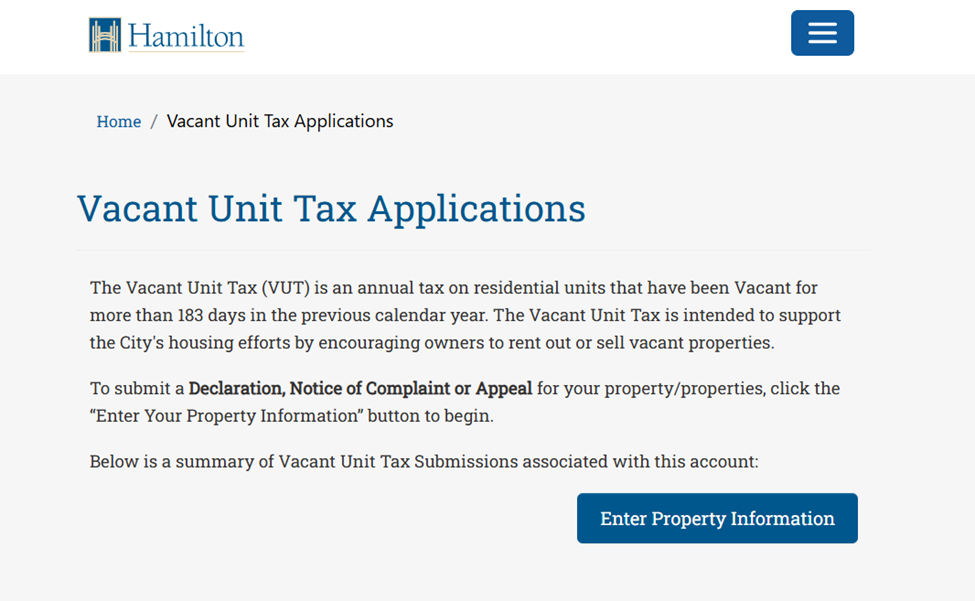
Click “Enter Property Information”

Review the Notice of Collection
Click “Start”
3. Enter Roll Number and Access Code

Enter your Roll Number (without the last four zeros)
Enter your Access Code
Select 2025 from the Occupancy Year dropdown
Click “Verify”
4. Confirm Property Information

Review the property details shown on screen
If correct, click “Confirm and Continue”
If not, select “Previous” to make corrections
5. Identify Your Role

From the dropdown menu, select whether you are:
The Property Owner, or
Submitting On Behalf of the Property Owner
Click “Next.”
6. Declare Occupancy Status

For each unit:
Click “View / Edit Unit Details”
Select the appropriate Occupancy Type

Click “Submit”
Repeat this step for all units or properties listed.
7. Review and Submit

Confirm that the occupancy status for all units is correct
Review the summary page

Check the box confirming the information is accurate

Click “Submit”
Confirmation

Once submitted, your annual Vacant Unit Tax declaration is complete.
You will receive a confirmation email.
Important Dates
Declaration Period Opens: December 17, 2025
Deadline: April 15, 2026
Late Declaration Deadline: May 15, 2026 (late fee applies)
Need Help?
If you experience any issues or have questions:
Email: vacantunittax@hamilton.ca
Phone: 905-546-2573
Declarations can also be completed by phone, email, mail, or in person at a Municipal Service Centre.
Download the Physical Declaration form
Online Declarations
Visit my.hamilton.ca to complete your declaration.
If you have any issues completing your declaration, please contact the Vacant Unit Tax team by email at vacantunittax@hamilton.ca or by phone at 905-546-2573.
Declaration by Phone
Declarations can also be submitted by calling 905-546-2573. Note: Long distance charges may apply for calls outside of Hamilton. Please check with your telephone service provider.
Declaration by Email, Mail or In-person
Email - Send completed form to vacantunittax@hamilton.ca
Mail or In-person - Printed declaration forms will be accepted in person at any Municipal Service Centre, or by mail to
Vacant Unit Tax
71 Main Street West
Hamilton, ON, L8P 4Y5
You can schedule an in-person appointment by phone at 905-546-2573.
To receive a declaration submission confirmation, all sections of the declaration form must be completed and signed. Declaration confirmations will be sent by email (if an email is provided on the form).
Consequences of Non-Submission
If a mandatory declaration is not submitted by the late declaration deadline of May 15, 2026, the residential unit will be considered vacant, and the Vacant Unit Tax will be charged.
Looking Ahead
Planned improvements to the online declaration process are expected in Q1 2026 as part of the City’s My.Hamilton platform enhancements, making future submissions faster and easier.
Stay tuned for updates.


Comments